Projects at a Glance
NIC Integration
HL7 v2.4 • JSON • REST • Rhapsody 6.4
Patient Data Query
Nphies HIE Integration
HL7 v2.3 • FHIR • CDA • Rhapsody 6.4
Healthcare Information Exchange
Pyxis ES Integration
HL7 v2.3, v2.5 • Rhapsody 6.4
Inpatient Pharmacy
Pharmaflow Integration
HL7 v2.3 • Rhapsody 6.4
Outpatient Robotic Pharmacy
4C Gate Integration
HL7 v2.3 • JSON • REST • Rhapsody 6.4
ED, OPD, PHC Quick Registration & Queuing
GE PACS Integration
HL7 v2.3 • Rhapsody 6.4
Radiology Result & Dictation
Cerner Classic Lab Integration
Cerner • Proprietary • Java • Rhapsody 4.1
Legacy Laboratory Results
NBS SMS & Email Alerts
HL7 v2.3 • Java • Rhapsody 6.4
Newborn Screening Remarkable Alerts
Sedco Queuing System
HL7 v2.3 • JSON • REST • Rhapsody 6.4
Quick Kiosk Check-In
Diabetic Registry Integration
HL7 v2.3 • SQL • Rhapsody 6.4
Diabetic Registry
EMR & Cloud Pharmacy Integration
HL7 v2.5 • JSON • REST • Mirth Connect 4.1
Online Pharmacy Prescription
API System & HIS Integration
HL7 v2.5 • JSON • REST • Mirth Connect 4.2
Patient Data Query
EMR & Dietary Management System Integration
HL7 v2.5 • JSON • REST • Mirth Connect 4.4
Physician Dietary Orders
Biobase LAB & LIMS Application Integration
HL7 v2.3 • TCP & File • Mirth Connect 4.5
Lab Result and LIMS Integration
Appointment & Modality Emulator Integration
JSON • HL7 v2.3 • Mirth Connect 4.5
Appointment & Modality Worklist
PACS Data Migration
SQL • PostgreSQL • Mirth Connect 4.4
PACS Data Migration Across Multiple Servers
Project Tracker with HL7 Message Interpreter
Java/J2EE• Oracle • SQL • Spring MVC
Integration Project Tracking Web Application
Cleartrip & IRCTC Services Integration
Java/J2EE • XML • Spring MVC • Web Services
Train Ticket Booking Application
Projects in Detail
NIC Integration
Integrating EHR Registration Module with the National Information Center (NIC)
My Role
Interface Analyst & Developer – Team of Two, Sole Rhapsody Developer
- Integration Engine: Rhapsody 6.4
- Other Tools: HL7 Smart Interpreter for HL7 message analysis and Postman for testing NIC services
- Data Standard: HL7 v2.4 (QBP and RSP messages) and JSON
- Connectivity: TCP/IP communication between the EHR and Rhapsody, and HTTPS communication between Rhapsody and the NIC .NET proxy service through the Government Service Network (GSN)
Project Overview
This project involved integrating the EHR patient registration module with the National Information Center (NIC) to retrieve patient demographic information. It is a synchronous query-response interface, in which the EHR sends a request containing the patient ID to NIC over the dedicated GSN (Government Service Network), and NIC responds with the patient’s demographic data.
The integration automates patient registration by retrieving basic demographic information using the patient’s National ID/Iqama and populating the EHR registration module during first-time registration. This speeds up the registration process and significantly reduces manual data-entry errors.
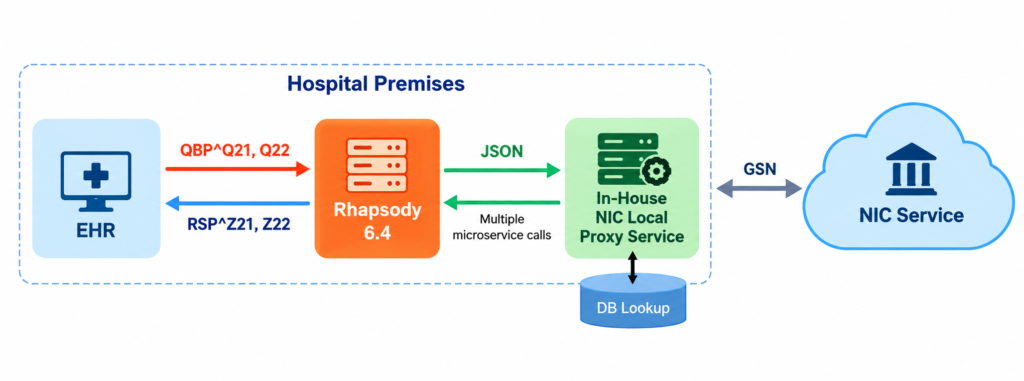
Basically, the integration comprises a single interface that consumes three NIC microservices:
- Basic Demographic Information
- Passport Information
- Title Information (e.g., Royal, Prince, etc.)
How It Works
The EHR registration module sends a request as an HL7 v2.4 QBP^Q21 message, which is received by the Rhapsody interface. Rhapsody constructs the required NIC JSON request and calls the NIC proxy service, which returns the patient’s demographic information in JSON format.
Rhapsody then transforms the response into an HL7 v2.4 RSP^Z21 message and sends it back to the EHR. This is a synchronous query-response communication.
The Rhapsody interface calls the three microservices sequentially, combines the returned information, and constructs a single HL7 response containing the combined patient information for the EHR.
The proxy service developed by our internal .NET team stores all responses from the NIC service in a local database lookup table. Whenever a request comes from Rhapsody, the proxy service first checks the database lookup table. If the required data is available, it retrieves the data from the database; otherwise, it calls the external NIC service, stores the response in the database lookup table, and returns the data to Rhapsody.
My Contributions
- Handled the full development lifecycle and technical aspects, from requirements analysis and interface design through implementation, testing, production deployment, monitoring, operational support, and documentation
- Worked on field mapping between EHR HL7 and NIC JSON
- Collaborated closely with the EHR Registration and NIC Proxy Service development team
Pyxis ES Integration
Integrating EHR Inpatient Pharmacy Module with the Pyxis ES System
My Role
Interface Analyst & Developer – Sole Rhapsody Developer
- Integration Engine: Rhapsody 6.4
- Other Tools: HL7 Smart Interpreter for HL7 message analysis
- Data Standard: HL7 v2.3 and v2.5 (ADT, RDE, MFN, DFT, and ZPM messages)
- Connectivity: TCP/IP communication between the EHR, Rhapsody, and Pyxis ES
Project Overview
This project involved integrating the EHR inpatient pharmacy module with the Pyxis inpatient pharmacy dispensing system.
The integration automates medication dispensing by eliminating manual prescription entry and keeps the EHR pharmacy module and Pyxis dispensing system synchronized in real time. It facilitates the exchange of patient and encounter information, medication orders, formulary data, and dispensing information through multiple real-time interfaces.
The EHR is a centralized system serving multiple facilities, with Pyxis ES installed in each inpatient pharmacy. Incoming HL7 messages are routed to the appropriate Pyxis system based on the patient’s location (PV1.3). For messages received from Pyxis ES, separate inbound interfaces are maintained for each facility.
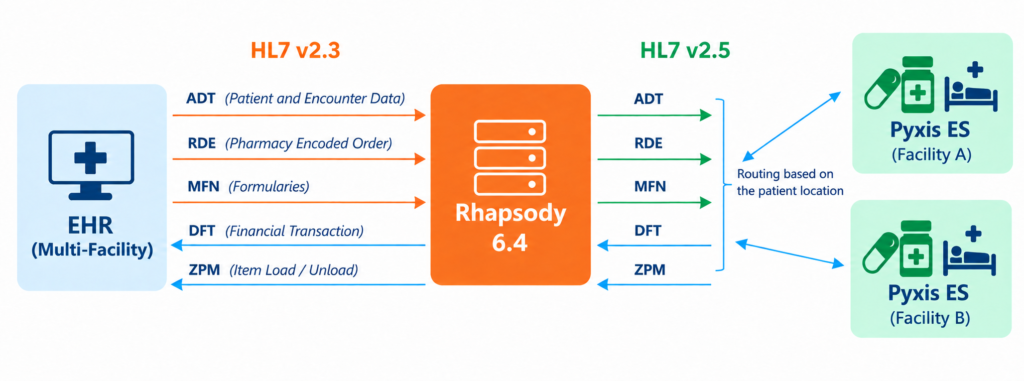
The integration comprises five interfaces: three outbound from the EHR and two inbound, as described below:
Three Outbound Interfaces (EHR to Pyxis):
- ADT: Patient and encounter information
- ADT^A01: Patient Admission Event
- ADT^A02: Patient Transfer Event
- ADT^A03: Patient Discharge Event
- ADT^A11: Admission Cancellation Event
- ADT^A12: Transfer Cancellation Event
- ADT^A13: Discharge Cancellation Event
- ADT^A08: Patient / Encounter Update Event
- ADT^A06: Outpatient-to-Inpatient Conversion Even
- RDE^O01: Pharmacy-encoded / prescription order information
- MFN^ZFM: Formulary add/update master file information
Two Inbound Interfaces (Pyxis to EHR):
- DFT^P03: Detailed financial transaction information
- ZPM: Item load and unload information
How It Works
Rhapsody receives ADT, RDE, and MFN messages in HL7 v2.3 format from the EHR. It transforms these messages into the required HL7 v2.5 format according to the Pyxis ES interface specifications and sends them to the Pyxis ES endpoint over TCP/IP.
Similarly, Rhapsody receives DFT and ZPM messages from Pyxis ES, transforms them according to the EHR’s inbound interface specifications, and sends the resulting messages to the EHR through a TCP/IP connection.
My Contributions
- Handled the full development lifecycle and technical aspects, from requirements analysis and interface design through implementation, testing, production deployment, monitoring, operational support, and documentation
- Collaborated closely with the EHR Inpatient Pharmacy and vendor team
Pharmaflow Integration
Integrating EHR Outpatient Pharmacy Module with the Pharmaflow Robotic Dispensing System
My Role
Interface Analyst & Developer – Sole Rhapsody Developer
- Integration Engine: Rhapsody 6.4
- Other Tools: HL7 Smart Interpreter for HL7 message analysis
- Data Standard: HL7 v2.3 and v2.4 (ADT, ORM/OMP, RDS/RDE, and MFN messages)
- Connectivity: TCP/IP communication between the EHR, Rhapsody, and Pharmaflow
Project Overview
This project involved integrating the EHR outpatient pharmacy module with the Pharmaflow outpatient pharmacy robotic dispensing system.
The integration automates medication dispensing by eliminating manual prescription entry and keeps the EHR pharmacy module and Pharmaflow dispensing system synchronized in real time. It facilitates the exchange of patient and encounter information, prescription orders, formulary data, and dispensing information through multiple real-time interfaces.
The robotic dispensing system helps manage high-volume outpatient pharmacy operations by streamlining the dispensing process, reducing manual effort, and improving the overall experience for pharmacists and patients.
The EHR is a centralized system serving multiple facilities, with Pharmaflow installed in each outpatient pharmacy. Incoming HL7 messages are routed to the appropriate system based on the patient’s location (PV1.3).
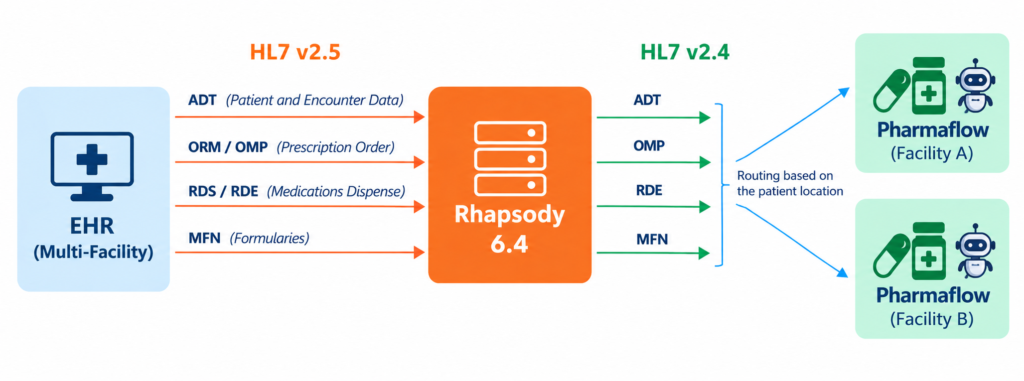
The integration comprises four interfaces, all outbound from the EHR to Pharmaflow, as described below
Four Outbound Interfaces (EHR to Pharmaflow):
- ADT: Patient and encounter information
- ADT^A01: Patient Admission Event
- ADT^A03: Patient Discharge Event
- ADT^A08: Patient / Encounter Update Event
- ADT^A04: Register a Patient
- ADT^A28: Add Person or Patient Information
- ADT^A31: Update Person Information
- ADT^A34: Merge Patient Information – Patient ID Only
- ADT^A40: Merge Patient – Patient Identifier List
- OMP^O09: Pharmacy/treatment order information (converted from EHR ORM^O01 order message)
- RDE^O01: Pharmacy-encoded order information (converted from EHR RDS^O01 pharmacy/treatment dispense information)
- MFN^ZFM: Formulary add/update master file information
How It Works
Rhapsody receives ADT, ORM, RDS, and MFN messages in HL7 v2.3 format from the EHR. It transforms these messages into the required format according to the Pharmaflow HL7 interface specifications and sends them to the Pharmaflow endpoint over TCP/IP.
Pharmaflow supports OMP^O09 for prescriptions and RDE^O01 for dispensing, while the EHR sends these events as ORM^O01 and RDS^O01, respectively. Rhapsody transforms the message types accordingly before sending them to Pharmaflow.
My Contributions
- Handled the full development lifecycle and technical aspects, from requirements analysis and interface design through implementation, testing, production deployment, monitoring, operational support, and documentation
- Collaborated closely with the EHR Outpatient Pharmacy and vendor team
- Interface customization through Cerner CCL for additional data enrichment
Sedco Integration
Integrating EHR Registration Module with the SEDCO Quick Check-In Kiosk System
My Role
Interface Analyst & Developer – Sole Rhapsody Developer
- Integration Engine: Rhapsody 6.4
- Other Tools: HL7 Smart Interpreter for HL7 message analysis
- Data Standard: HL7 v2.5 Query/Response (QBP^Q21 and RSP^K21 messages)
- Connectivity: TCP/IP communication between the EHR and Rhapsody, and HTTP communication between Rhapsody and the SEDCO system
Project Overview
This project involved integrating the EHR registration module with the SEDCO patient queuing system.
The integration automates and streamlines patient check-in and helps manage high-volume patient flow. Patients can enter their MRN or National ID/Iqama through a kiosk and complete the arrival check-in quickly and conveniently without assistance. The kiosk then prints a queue token, and the patient proceeds to the waiting area until their token is called. A dashboard displays the currently called token number.
The EHR is a centralized system serving multiple facilities, with two common interfaces connecting it to SEDCO systems installed in selected outpatient registration areas.
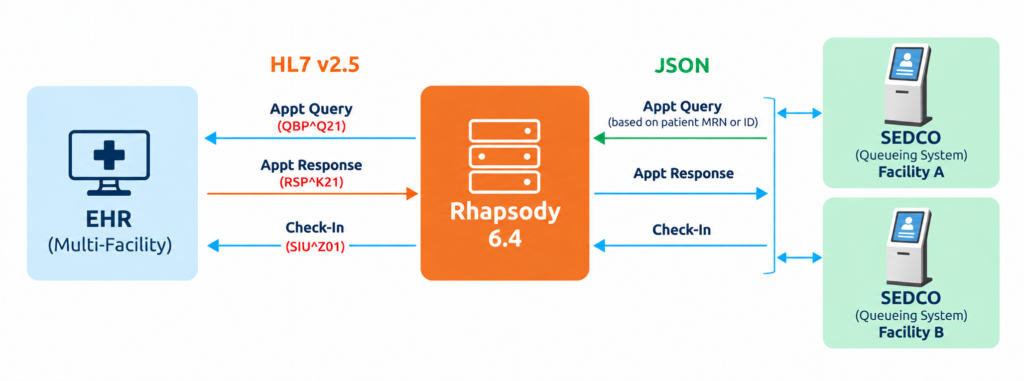
The integration comprises two interfaces, as described below:
Two Interfaces (SEDCO to EHR):
- Patient Appointment Query/Response
- QBP^Q21: Patient Demographics Query
- RSP^K21: Patient Demographics Response
- SIU^Z01: Patient Arrival and Check-In
These are customized interfaces for which dedicated code was developed to retrieve and include additional patient and appointment information in the response.
How It Works
Appointment Query:
Rhapsody receives an HTTP request from SEDCO containing the patient’s MRN or ID. It transforms the request into an HL7 v2.5 QBP^Q21 message and sends it to the EHR. The EHR returns an HL7 v2.5 RSP^K21 response containing the patient’s demographic and appointment details, if available. Rhapsody transforms the response into JSON and sends it back to SEDCO.
The patient information includes details such as VIP status, age, and diagnosis, which SEDCO uses to determine patient priority in the queue.
Patient Check-In:
Using the appointment information received from the query, SEDCO initiates the second interface by sending the patient’s demographic and appointment details as JSON to Rhapsody. Rhapsody transforms the JSON into an HL7 v2.5 SIU^Z01 check-in message and sends it to the EHR. The EHR’s response is then returned to SEDCO through Rhapsody.
Once the check-in is successfully completed, the kiosk generates and prints a queue token for the patient.
My Contributions
- Handled the full development lifecycle and technical aspects, from requirements analysis and interface design through implementation, testing, production deployment, monitoring, operational support, and documentation
- Collaborated closely with the EHR Registration and vendor team
- Interface customization through Cerner CCL for additional data enrichment
NBS (Newborn Screening) Alert Integration
Integrating EHR Laboratory Module with the SMS & Email Alerting System
My Role
Interface Analyst & Developer – Sole Rhapsody Developer
- Integration Engine: Rhapsody 6.4
- Other Tools: HL7 Smart Interpreter for HL7 message analysis
- Data Standard: HL7 v2.3 (ORU^R01 message), SOAP, and plain-text email with attachment
- Connectivity: TCP/IP communication between the EHR and Rhapsody, JDBC for database connectivity, SOAP for SMS communication, and SMTP for email communication
Project Overview:
This project involved integrating the EHR Laboratory Module with the hospital’s SMS and email alerting systems to notify assigned physicians when a newborn’s laboratory results showed remarkable findings, enabling them to take the necessary action promptly.
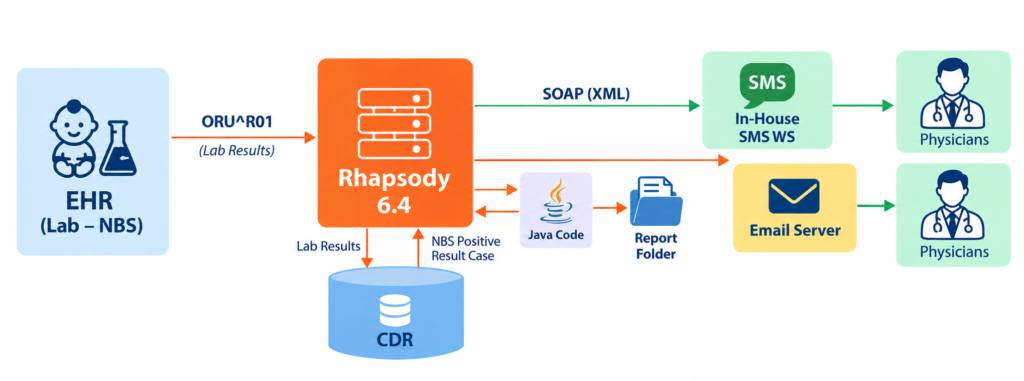
The integration comprises three interfaces, as described below:
One Outbound Interface (EHR to CDR):
- ORU^R01: Laboratory Results
Two Outbound Interfaces (CDR to Email & SMS Services):
- SMS Alert: Calls the internal SMS service to send alerts
- Email Alert: Sends the laboratory report as a PDF attachment through the hospital email server
Laboratory Results & SMS Alert Interface
The first interface receives laboratory results and stores them in the CDR (Central Data Repository), an Oracle database. The SMS alert interface continuously polls the CDR to detect positive results. When a positive result is identified, it constructs an SMS containing the relevant patient and location details and immediately sends it to the pre-assigned physicians’ mobile numbers.
Email Alert Interface
The email alert interface runs every 5 minutes and checks the CDR for positive results. When a positive result is identified, it constructs an email containing the relevant patient details and invokes a Java program to retrieve the corresponding laboratory report.
The Java program polls a network directory where laboratory reports are stored as PDF files. It searches for the latest report using the patient’s MRN and returns the report as binary data, which Rhapsody receives and attaches to the email before sending it to the assigned physicians’ email addresses.
- Handled the full development lifecycle and technical aspects, from requirements analysis and interface design through implementation, testing, production deployment, monitoring, operational support, and documentation
- Developed a Java program to retrieve the latest PDF report from a directory based on the patient’s MRN and implemented the Rhapsody interfaces
- Collaborated closely with the EHR Laboratory team
Cerner Classic Lab Integration
Integrating Legacy Cerner Classic Laboratory System with Downstream Healthcare Systems
My Role
Interface Analyst & Developer – Sole Rhapsody Developer
- Integration Engine: Rhapsody 4.1
- Tools: Self-developed custom HTML page for interpreting legacy records based on their delimiters
- Data Standard: Cerner Classic legacy data format and XML for database entries
- Connectivity: FTP(S) between the FTP server and Rhapsody, and JDBC for database connectivity
Project Overview:
This project involved integrating the legacy Cerner Classic Laboratory System with the hospital’s downstream system such as HP 3000 mainframe, Physician and Patient Portal, ICIP systems etc.
Before this integration, an existing mechanism could take up to three days to make laboratory results available to downstream systems. In emergency cases, users had to obtain special privileges to access the results directly from the Cerner Classic system using a tool called “Cerner Reflection”.
With this integration, laboratory results could be made available in the downstream systems almost in real time, significantly reducing the previous delay.
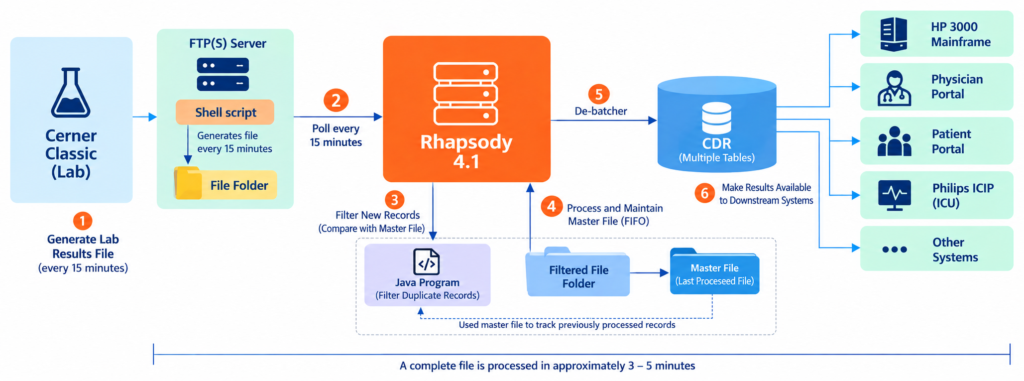
The integration comprises three interfaces, as described below:
- File Polling Interface: Polls the FTP server every 15 minutes for new laboratory result files
- Java Program Calling Interface: Invokes a Java program to filter new records by comparing the current file with the master file
- Main Interface: Parses the legacy data format, transforms it into XML, and inserts or updates CDR tables
1. Generate Lab Results File
A shell script generates a binary laboratory results file and stores it on an FTP server every 15 minutes.
2. Poll the FTP Directory
Rhapsody polls the FTP directory every 15 minutes for new files.
3. Filter New Records
Rhapsody invokes a Java program to compare the current file with the master file (last processed file) and extract only new records into the “Filtered File” folder.
4. Process and Maintain Master File
A separate Rhapsody interface processes filtered files in FIFO (First-In, First-Out) order and maintains the latest processed file as the master file.
5. Parse and Store Results in the CDR
Rhapsody de-batches the file into individual records and stores the results in the CDR (Central Data Repository) across multiple tables. It parses the Cerner Classic legacy format using its predefined delimiters and transforms the data into structured XML for CDR processing.
6. Make Results Available to Downstream Systems
Once stored in the CDR, laboratory results become immediately available to downstream systems, including the HP3000 Mainframe, Physician Portal, Patient Portal, Philips ICIP (ICU), and other connected applications.
My Contributions
- Handled the full development lifecycle and technical aspects, from requirements analysis and interface design through implementation, testing, production deployment, monitoring, operational support, and documentation
- Developed a Java program to filter duplicate records, and implemented the Rhapsody interfaces
- Also, developed a custom HTML/JavaScript page to parse and visualize Cerner Classic records and fields in tabular format, simplifying data validation and troubleshooting
- Collaborated closely with the EHR Cerner Classic Laboratory and HP3000 teams
GE PACS Integration
Integrating GE PACS System with the EHR RIS Module and Dictation System
My Role
Interface Analyst & Developer – Team of Two
- Integration Engine: Rhapsody 6.4
- Other Tools: HL7 Smart Interpreter for HL7 message analysis
- Data Standard: HL7 v2.3 (ADT, ORM and ORU messages)
- Connectivity: TCP/IP communication between the EHR, Rhapsody, PACS and Powerscribe
Project Overview:
This project involved integrating the GE PACS system with the hospital’s EHR RIS module and the Powerscribe dictation system.
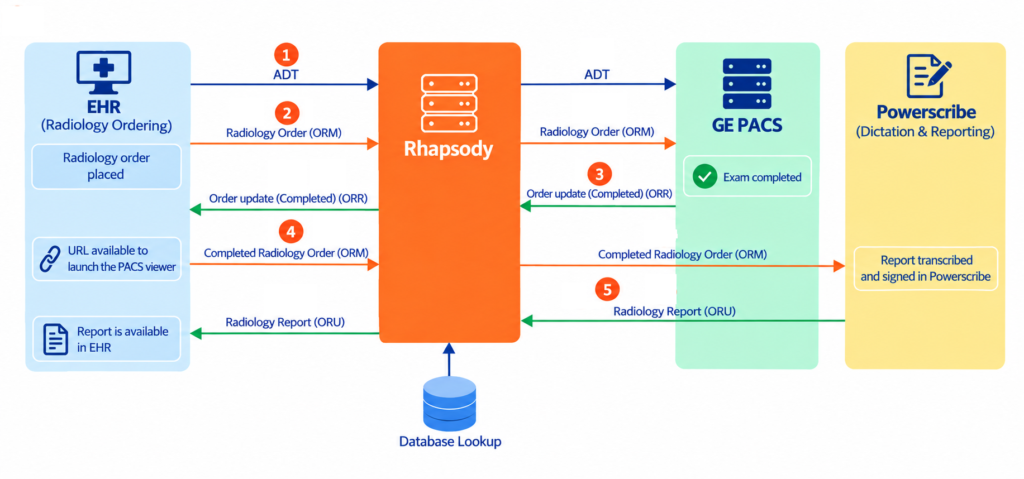
Three Outbound Interfaces (EHR to PACS / Dictation)
- ADT: Patient and encounter information from the EHR to the PACS system
- ADT^A01: Patient Admission Event
- ADT^A04: Patient Registration Event
- ADT^A08: Patient Information Update Event
- ADT^A34: Patient ID Merge Event
- ORM^O01: Radiology Order from the EHR to the PACS system
- ORM^O01: Radiology Completed Status Order from the EHR to the Dictation System
Two Inbound Interfaces (PACS / Dictation to EHR)
- ORR^O02: Order Status Response from the PACS system to the EHR
- ORU^R01: Dictated Radiology Observation Results from the Dictation System to the EHR
My Contributions
- Contributed to the full development lifecycle and technical implementation, from requirements analysis and interface design through testing, deployment, monitoring, support, and documentation
- Implemented dynamic procedure-code mapping between the EHR and GE PACS using a database lookup table
- Collaborated closely with the EHR Radiology and GE vendor team
4C Gate Integration
Integrating EHR with Quick Registration and Queueing System
My Role
Interface Analyst & Developer – Sole Rhapsody Developer
- Integration Engine: Rhapsody 6.4
- Other Tools: HL7 Smart Interpreter for HL7 message analysis
- Data Standard: HL7 v2.3 and v2.5 (ADT, ORM, ORU, SIU, and Query/Response mesages) and JSON
- Connectivity: TCP/IP communication between the EHR and Rhapsody, and HTTP and TCP/IP communication between Rhapsody and 4C-Gate
Project Overview:
This project involved integrating the 4C-Gate system with the hospital’s EHR to manage patient flow across various clinics, mainly the ED (Emergency Department), OPD (Outpatient Department), and PHC (Primary Health Center).
The integration comprises three groups of interfaces: one dedicated to the ED and two similar interface groups for the OPD and PHC. The OPD and PHC interfaces follow the same integration workflow. Let’s start with the 4C-Gate integration in the ED.
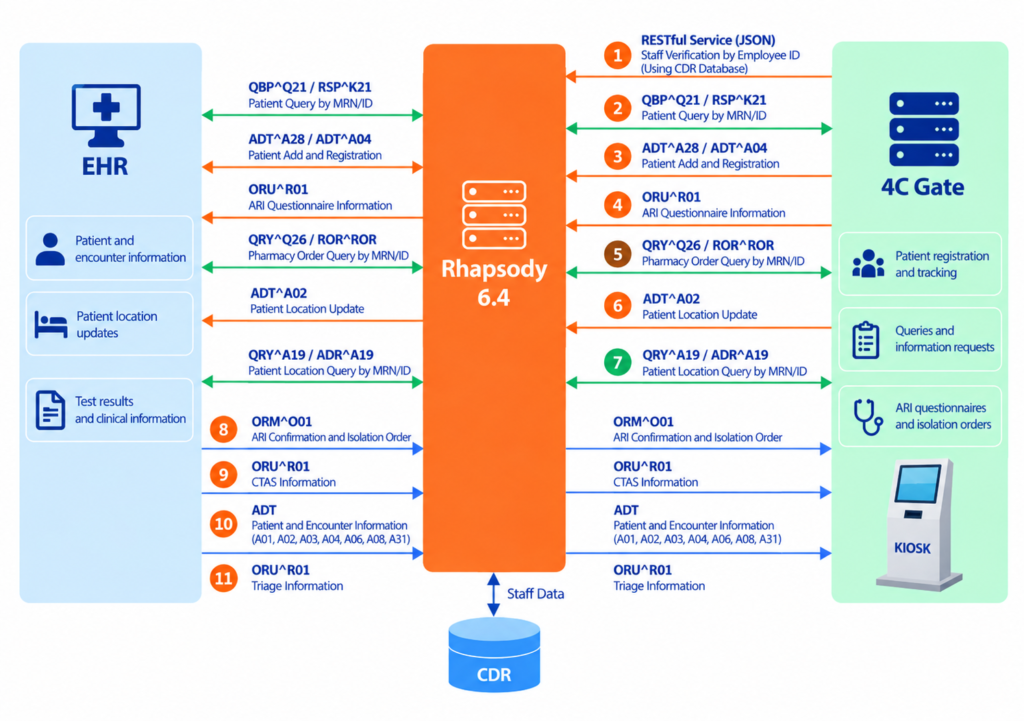
The integration comprises eleven interfaces: three inbound, four query/response, and four outbound.
Three Inbound Interfaces (4C-Gate to EHR)
- ADT^A28 / ADT^A04: Patient Add and Registration
- ORU^R01: ARI Questionnaire Information
- ADT^A02: Patient Location Update
Four Query/Response Interfaces (4C-Gate to EHR/CDR)
- QBP^Q21 / RSP^K21: Patient Query by MRN/ID
- QRY^A19 / ADR^A19: Patient Location Query by MRN/ID
- QRY^Q26 / ROR^ROR: Pharmacy Order Query by MRN/ID
- RESTful Service (JSON): Staff Verification using the CDR database by Employee ID
All of these query/response interfaces are customized interfaces that use Z-segments. I wrote CCL scripts on the EHR interface side to support the required customization and data processing.
Four Outbound Interfaces (EHR to 4C-Gate)
- ADT: Patient and Encounter Information (A01, A02, A03, A04, A06, A08, A31)
- ORM^O01: ARI Confirmation and Isolation Order
- ORU^R01: CTAS Information
- ORU^R01: Triage Information
How It Works
Once the patient’s information is found or created, 4C-Gate invokes the patient registration interface to create an emergency encounter, and the EHR returns the corresponding Visit ID (FIN)
5. Active Medication Information
For existing patients, staff can retrieve the patient’s current active medication information through the Pharmacy Order Query interface
4C-Gate can update the patient’s current location in the EHR through the inbound location update interface
4C-Gate can verify the patient’s current location against the EHR through the Patient Tracking Query/Response interface
8. EHR ARI Confirmation
The ARI questionnaire from Step 4 is reviewed and confirmed by the physician in the EHR. The EHR then sends the isolation order to 4C-Gate.
9. CTAS Information from EHR to 4C-Gate
It is a 5-level triage system called CTAS (Canadian Triage and Acuity Scale) used to assess how urgently an ED patient needs medical attention
10. Patient and Encounter Information Synchronization
The EHR continuously updates the 4C-Gate system with the patient’s current demographic and encounter information through the ADT outbound interface
11. EHR Triage Information Update to 4C-Gate
This interface notifies the 4C-Gate system when the patient’s triage has been completed in the EHR
4C-Gate: OPD & PHC Integration
This integration primarily supports patient self-check-in through kiosks in OPD and PHC clinics. Patients can use the kiosk to verify their identity, retrieve their appointment information, and complete the check-in process without staff assistance.
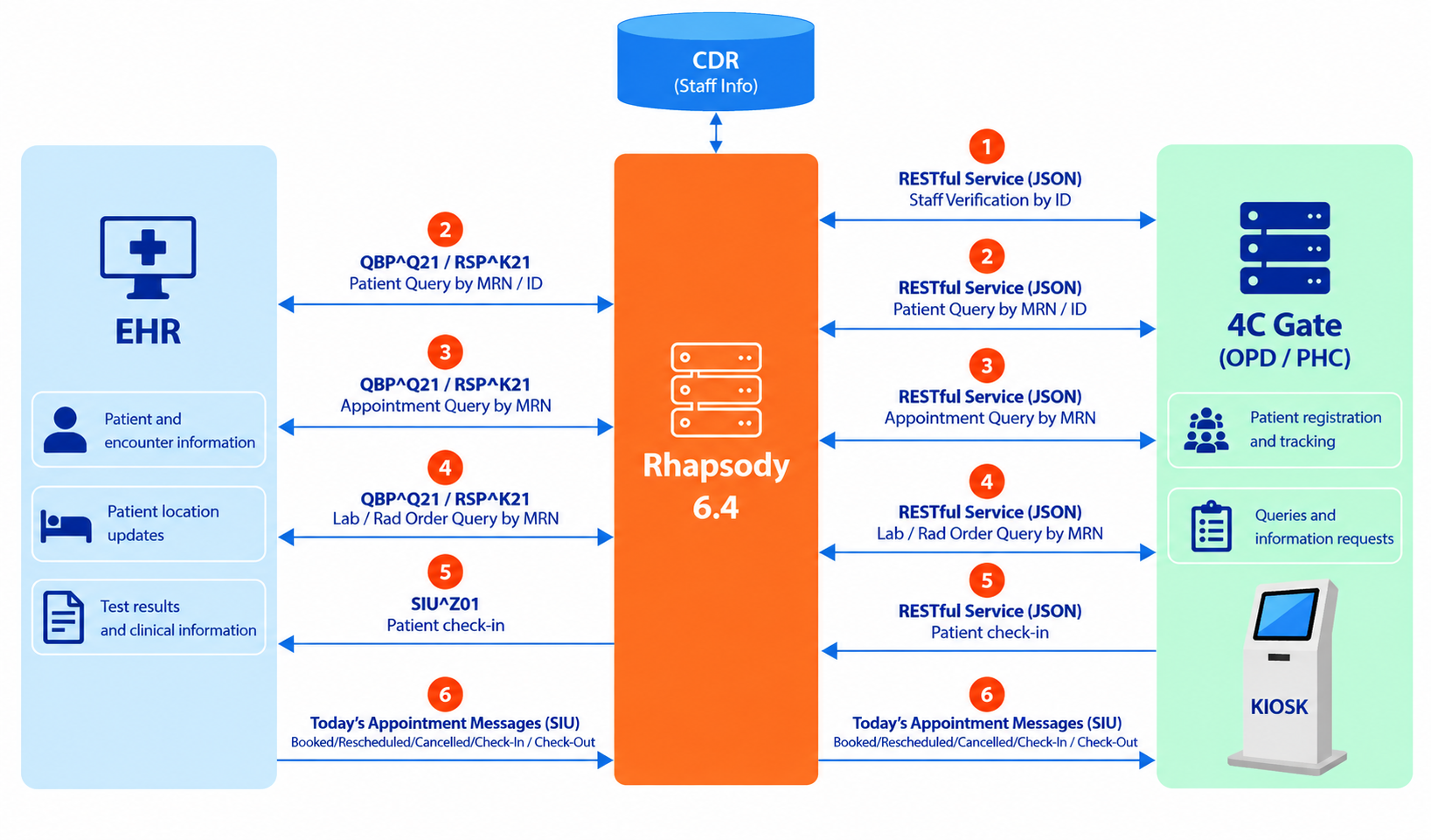
The integration comprises six interfaces: one inbound, four query/response, and one outbound.
Four Query/Response Interfaces (4C-Gate to EHR/CDR)
- RESTful Service (JSON): Staff Verification using the CDR database by Employee ID
- QBP^Q21 / RSP^K21: Patient Query by MRN/ID
- QBP^Q21 / RSP^K21: Appointment Query by MRN
- QBP^Q21 / RSP^K21: Lab / Rad Order Query by MRN
QBP^Q21 / RSP^K21) are exchanged between Rhapsody and the EHR interfaces over TCP/IP connections. Between 4C-Gate and Rhapsody, data is exchanged in JSON format over HTTP connections. Hence, Rhapsody performs the message transformation between JSON and HL7 v2.3, and vice versa.- SIU^Z01: Patient Arrival/Check-In through Kiosk
One Outbound Interface (EHR to 4C-Gate)
- SIU: Today’s Appointment-Related Information
- S12: Notification of new appointment booking
- S13: Notification of appointment rescheduling
- S15: Notification of appointment cancellation
- Z01: Check-In
- Z02: Check-Out
- S26: No Show
How It Works
1. Staff Verification
To to do check-in, 4C-Gate KIOSK first prompt the patient to enter MRN or National ID/Iqama and retrieves the patient’s information from the EHR through the Rhapsody patient query interface to verify the patient.
3. Check Today’s Appointment
If the patient is eligible, 4C-Gate invokes the appointment query interface to verify that the patient has an appointment scheduled for today at the current clinic.
If the patient does not exist, the patient record has expired, or there is no appointment scheduled for today, the kiosk displays an appropriate message and declines the check-in.
If the patient is eligible and has a valid appointment, 4C-Gate invokes the check-in interface to notify the EHR that the patient has arrived.
Steps 2, 3, and 4 are executed sequentially by 4C-Gate. The patient only needs to enter their MRN or National ID/Iqama. Once these steps are completed successfully, the kiosk issues a queue ticket, and the patient waits for their turn.
5. Lab / Radiology Order Query
This interface is used when the patient selects the Radiology or Laboratory option on the kiosk. 4C-Gate queries the EHR to check whether the patient has any relevant radiology or laboratory orders.
6. Patient Appointment Information Synchronization
Today’s appointment information is synchronized from the EHR with 4C-Gate to keep the system updated in real time.
My Contributions
- Contributed to the full development lifecycle and technical implementation, from requirements analysis and interface design through testing, deployment, monitoring, support, and documentation
- Designed the required HL7 and JSON message samples, along with the field mappings between them
- Interface customization through Cerner CCL for additional data enrichment
- Collaborated closely with the EHR, ED department, and vendor teams
- Provided 24×7 support for these high-priority interfaces due to their critical role in the Emergency Department
Diabetic Registry Integration
Integrating Centralized Diabetic Registry with the On-Premises and External EHR Systems
My Role
Interface Analyst & Developer – Sole Rhapsody Developer
- Integration Engine: Rhapsody 6.4
- Other Tools: HL7 Smart Interpreter for HL7 message analysis
- Data Standard: HL7 v2.3 (ORU^R01 messages)
- Connectivity: TTCP/IP communication between the internal EHR and Rhapsody, and RESTful APIs hosted on an IIS server for external EHRs
Project Overview:
This project involved integrating the in-house Centralized Diabetic Registry application with the on-premises and external EHR systems.
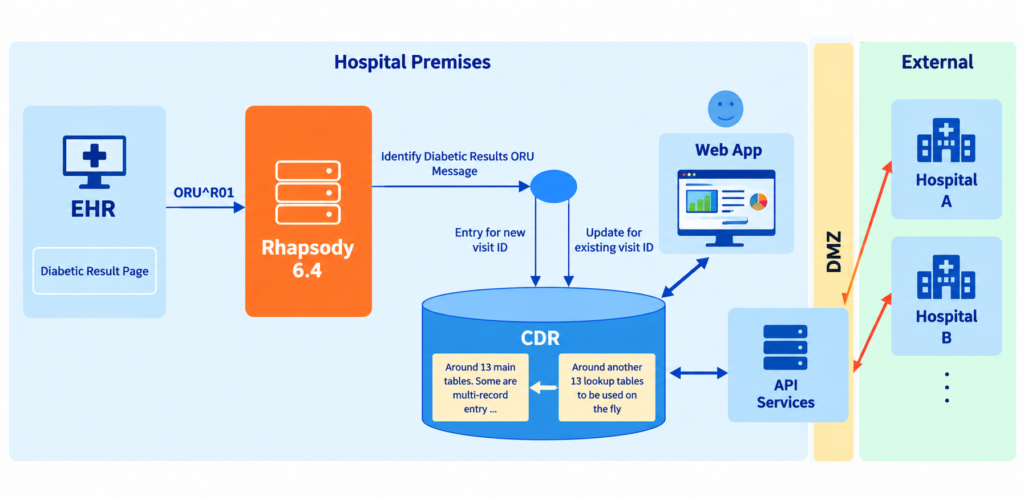
The integration comprises two modules, handled by two teams:
- Internal EHR Integration with Rhapsody
- External EHR Integration through .NET API Services
The Internal EHR Integration comprises one complex outbound interface (EHR to Diabetic Registry):
- ORU^R01: Diabetic Registry-Related Results from the EHR.
The message contains diabetes-related clinical information, including eye and foot observations, vaccination history, neuropathy examination results, medication history, recent laboratory results (Hemoglobin A1c, HDL cholesterol, LDL cholesterol, Total cholesterol, and Microalbumin/Creatinine urine ratio), vital signs (height, weight, and BMI), blood pressure, smoking status, and annual eGFR check status.
Whenever the Diabetic Registry module in the EHR submits a result, it triggers an HL7 v2.3 ORU^R01 message.
The message is received by the Rhapsody interface implemented for the Diabetic Registry application, which transforms it into a complex XML structure containing multiple single and repeating records, designed according to the database tables of the backend Diabetic Registry application (approximately 13 main tables and 13 lookup tables).
Once the XML structure is created and populated with data from the HL7 message, Rhapsody invokes the database interface to insert data for a new Visit ID or update data for an existing Visit ID.
A web-based dashboard, developed by our .NET team, runs on top of these database tables. The same tables are also populated with data from external EHRs through RESTful APIs developed by the .NET team, making the application a centralized Diabetic Registry system. The consolidated data supports research activities and provides valuable population health insights.
My Contributions
- Contributed to the full development lifecycle and technical implementation, from requirements analysis and interface design through testing, deployment, monitoring, support, and documentation
- A key part of this integration was mapping the database tables and fields to the corresponding HL7 v2.3 ORU^R01 message elements. I documented the HL7 field meanings and relevant information to facilitate the mapping in collaboration with the project analysts
- Collaborated closely with the EHR and Diabetic Registry teams
Nphies HIE Integration
Integrating Multi-Facility EHR System with nphies HIE Platform
My Role
Interface Analyst & Developer – Team of 3
- Integration Engine: Rhapsody 6.4
- Other Tools: HL7 Smart Interpreter for HL7 message analysis
- Data Standard: HL7 v2.3 and v2.5.1 (ADT, ORM, RDS, ORU, and VXU messages), FHIR R4, JSON and CDA
- Connectivity: TCP/IP communication between the internal EHR and Rhapsody, and HTTPS/SOAP communication between Rhapsody and Nphies endpoints
Project Overview:
This project involved integrating the hospital’s on-premises multi-facility EHR system with the external HIE platform, NPHIES (National Platform for Health and Insurance Exchange Services).
This integration enables the EHR to securely exchange patient health information with nphies, supporting interoperability and continuity of care across healthcare organizations. It facilitates the exchange of clinical and administrative information using standardized healthcare data formats such as HL7 v2.3, FHIR, and CDA.
Nphies provides a Unified Health Record for patients in Saudi Arabia through a centralized Health Information Exchange (HIE) platform. It connects healthcare providers and aggregates patient information from multiple healthcare systems, providing authorized healthcare professionals with a comprehensive longitudinal view of patient information. This supports better-informed decisions, more efficient and coordinated care, improved patient safety, reduced duplicate or unnecessary testing and medical errors, and greater healthcare efficiency.
Key Benefits of HIE Integration:
- Improved Efficiency: Enabled near real-time access to longitudinal patient health information, including medical data, reports, test results, and prescriptions
- Better Accessibility: Provided standardized and centralized health information accessible to authorized stakeholders through controlled and monitored data exchange
- Healthcare Quality & Patient Safety: Supported faster, safer, and higher-quality patient care while maintaining patient confidentiality and data privacy
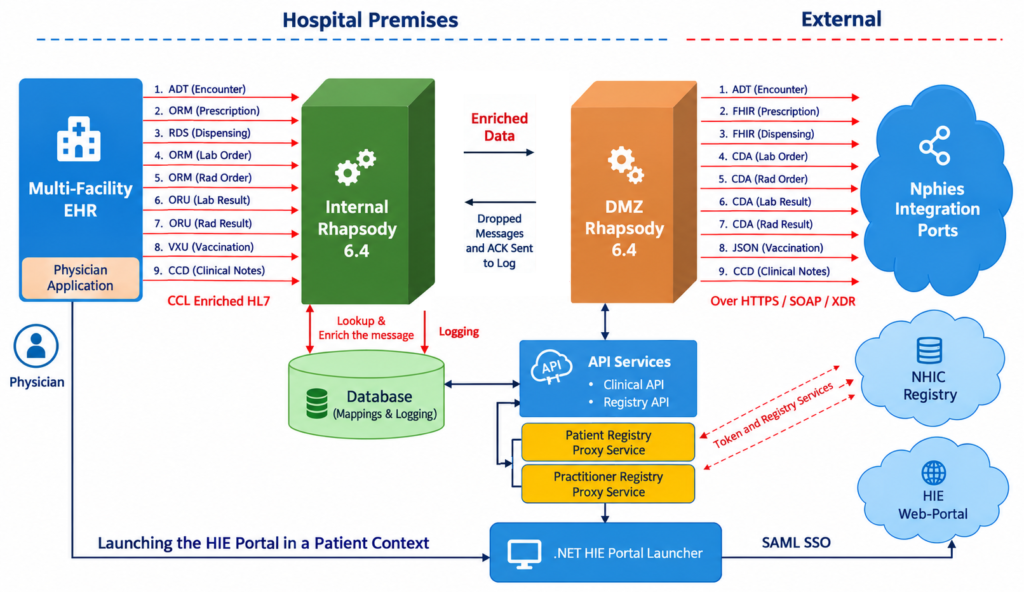
The integration comprises three modules, handled by three teams:
- EHR and Internal Rhapsody: Handles EHR integration, primary data enrichment, and customization
- DMZ Rhapsody: Handles data-format transformation, registry service & API calls, and integration with nphies endpoints
- .NET Development: Develops and maintains the data-mapping API, NHIC Registry Proxy Services, and SSO Launcher module
The integration comprises nine outbound interfaces from the EHR to nphies through two Rhapsody engines (Internal and DMZ)
- ADT: Patient Encounter Information. It include message trigger events – A01, A02, A03, A04, A06, A07, A08, A1, A12, A13, A35, and A38
- ORM^O01: Pharmacy Prescription Order
- RDS^O01: Pharmacy Dispense
- ORM^O01: Laboratory Order
- ORM^O01: Radiology Order
- ORU^R01: Laboratory Result
- ORU^R01: Radiology Result
- VXU^V04: Vaccination and
- CCD (XML): For Clinical Notes
The main challenges we faced and the solutions we implemented are as follows:
1. Data Gap Analysis:
This phase involved analyzing the existing EHR data (HL7 v2.x messages) to identify fields available in the EHR and those missing or optional in the EHR but required by nphies specifications. This is performed for each interface.
Since we are transforming HL7 v2.x messages to FHIR R4 for pharmacy, and CDA for laboratory and radiology orders and results, we needed to understand each field and its meaning in greater depth to perform accurate mapping. We referred to the relevant specifications and documentation, using examples where available, to understand field definitions and usage and ensure accurate mapping.
This gap analysis formed the foundation for the subsequent data-enrichment phase.
2. Data Enrichment Requirement:
The EHR’s standard HL7 v2.x messages did not contain all the data required by nphies specifications, requiring extensive data enrichment from the EHR backend through interface-specific scripts. Additionally, some previously optional fields had to be made mandatory in the EHR application.
3. Code & Terminology Mapping Requirement:
The administrative and clinical codes used in the EHR differ from those required by the Nphies platform. Extensive code mapping was therefore required in collaboration with specialized departments, including Registration, Scheduling, Physicians, Pharmacy, Laboratory, and Radiology.
Code mapping was the most time-consuming part of the project and one of its biggest challenges, particularly the accurate mapping of laboratory orders and results.
Some of the fields for which we maintain mappings include:
- Allergy
- Allergy Type
- Country
- Diagnosis Type
- Dosage Form
- Facility
- Gender
- Marital Status
- Nationality
- Order Status
- Result Status
- Result Unit
- Order Catalog (Laboratory and Radiology Orders)
- Clinical Event (Laboratory Results)
- Patient Class
- Procedure Code (Modality and Body Region)
- Route
- Vaccination Name
- Medication Name, Unit, and Strength mappings for prescriptions and dispensing items with NHIC generic and brand medication items
4 . Secure Connectivity and Data Exchange:
Since the integration involves systems outside the hospital premises, we had to address various security and firewall requirements. These were mainly resolved in collaboration with the hospital’s security, systems, and network teams. To ensure secure data transmission, we used HTTPS with certificates for encrypted communication.
The second team was responsible for implementing the interfaces in the DMZ Rhapsody environment. These interfaces perform two main tasks:
- Transform message formats from HL7 v2.x to FHIR R4 resources, CDA, and JSON according to the mappings defined during the Data Gap Analysis phase
- Perform final data enrichment by calling registry services to retrieve the patient Health ID and physician ID, and API services to retrieve additional mappings from the maintained database lookup tables
- Send the final data to the nphies endpoints and return the processing status to the internal Rhapsody for logging and reporting purposes
- Database Mapping API: Developed an API to retrieve additional mappings from the database lookup tables
- SAML SSO: Developed SAML-based Single Sign-On (SSO) to launch the Nphies portal directly from the EHR Physician Module.
How It Works
- Data Enrichment – Level 1: When an event occurs in the EHR, the corresponding HL7 v2.x message is triggered with additional customized data in Z-segments and sent to the internal Rhapsody interfaces.
- Data Enrichment – Level 2: Internal Rhapsody further enriches the HL7 message using database lookup tables maintained for code mapping. After processing and cleanup, the message is sent to the DMZ Rhapsody for further processing.
- Data Enrichment – Level 3: DMZ Rhapsody further enriches the data using Patient and Practitioner Registry APIs to retrieve the Patient Health ID and Practitioner ID, along with the Facility OID and additional mapped values from database lookup tables through API services.
- Data Transformation: The data is transformed from HL7 v2.x (except clinical notes, which use CDA) into the required FHIR R4 resources, JSON, or CDA format and sent to the external nphies secured endpoints.
- Message Dropping: In some cases, the Patient and Practitioner Registry APIs may not return the Patient Health ID or Practitioner ID due to incorrect input parameters (National ID and DOB) or for newborn patients. Since these IDs are mandatory, the DMZ interface drops the message.
- Status & Logging: Whether the message is sent or dropped, the DMZ Rhapsody interface returns the processing status to the internal Rhapsody interface, which logs it in a database table.
- Weekly Reporting: A separate interface reads the log table and generates a weekly report showing the number of messages sent to nphies and the number dropped.
My Contributions
- Contributed to the full development lifecycle and technical implementation, from requirements analysis and interface design through testing, deployment, monitoring, support, and documentation
- Performed data gap analysis and field mapping in collaboration with the vendor team
- Maintained administrative and clinical data mappings in collaboration with the database team
- Performed EHR back-end data enrichment through customized CCL scripts. The EHR has its own built-in integration module
- Implemented all interfaces in the internal Rhapsody environment, with a second level of data enrichment through database lookups
- Collaborated closely with the EHR team, various departments (Pharmacy, Physicians, Laboratory, and Radiology), and the vendor team
EMR & Cloud Pharmacy Integration
Integrating an EMR with Multiple Pharmacy Systems in the Cloud
My Role
Interface Analyst & Developer – Sole Mirth Connect Developer
- Integration Engine: Mirth Connect 4.1.0
- Other Tools: HL7 Smart Interpreter for HL7 message analysis
- Data Standard: HL7 v2.5 (
OMP^O09messages) - Connectivity: Secured HTTPS communication between the cloud EMR and Mirth Connect via Stunnel, and HTTPS communication between Mirth Connect and the cloud pharmacy systems
Project Overview:
This project involved integrating a cloud-based EMR with multiple cloud pharmacy systems to enable the EMR to send online pharmacy orders and prescriptions to the respective pharmacy systems.
The client provided HL7 v2.5 OMP^O01 message samples from the EMR and needed to integrate with multiple pharmacy systems that support only RESTful JSON data structures. The client also did not have an integration engine, while the EMR team required HTTPS connectivity for secure data exchange.
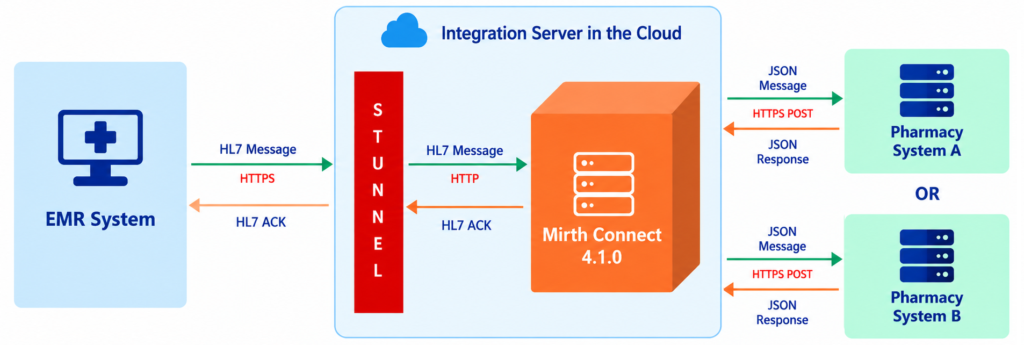
The integration comprises one channel:
- OMP^O09: EMR Physician Pharmacy Prescription Orders
Since the free version of Mirth Connect does not support HTTPS connectivity, I conducted online research and successfully configured a Stunnel (open-source) layer on the same Mirth Connect server using the client-provided HTTPS certificate.
When a medication prescription is entered in the EMR, an OMP^O09 HL7 message is triggered and sent to the Mirth Connect channel over HTTPS through Stunnel as shown in the flow diagram above.
The Mirth Connect channel receives the HL7 message, transforms it into JSON, and routes it to the appropriate pharmacy system based on the intended recipient information in the HL7 message.
After successfully posting the JSON request, the Mirth Connect channel receives a JSON response from the pharmacy system. It transforms the JSON response into an HL7 ACK message and sends it back to the EMR, completing the transaction cycle. The same process is followed for every pharmacy order received from the EMR.
My Contributions
- Infrastructure Setup:
- Installed Mirth Connect 4.1.0 on the client-provided Linux server (CentOS 7) through remote access
- Installed MySQL and configured it as the Mirth Connect database
- Installed and configured Stunnel using the client-provided HTTPS certificate
- Configured the connection between Stunnel and Mirth Connect
- Data Design: Designed the JSON data format for the pharmacy application based on the EMR’s HL7 v2.5 sample messages and reviewed it with the client
- Implementation: Developed and configured the Mirth Connect channel
- Testing & Production Deployment: Completed UAT and moved the interface to the production environment
- Documentation: Prepared a clear and simple user manual with flow diagrams, implementation details, and potential maintenance procedures, including failure checkpoints, Stunnel maintenance, and HTTPS certificate renewal, to enable the client to support and maintain the integration independently in the future
API System & HIS Integration
Integrating an API System with HIS for Patient Data
My Role
Interface Analyst & Developer – Sole Mirth Connect Developer
- Integration Engine: Mirth Connect 4.2.0
- Other Tools: HL7 Smart Interpreter for HL7 message analysis
- Data Standard: HL7 v2.5 (QRY^A19 and
ADR^A19messages) and JSON - Connectivity: HTTP communication between the API System and Mirth Connect, and TCP/IP communication between Mirth Connect and the HIS
Project Overview:
This project involved integrating a cloud-based API System with the HIS to retrieve patient information through a unique integration flow. The client provided HL7 v2.5 (QRY^A19 and ADR^A19) message samples from the HIS, along with the JSON format expected by the API System.
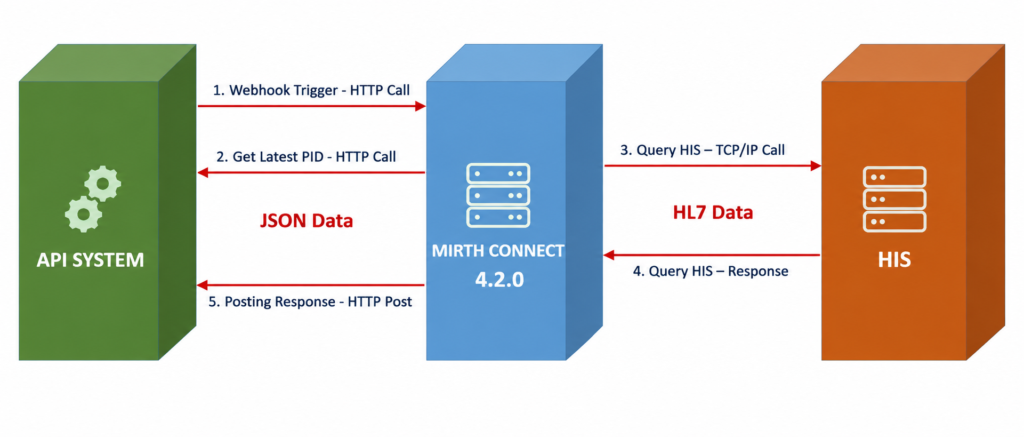
The integration comprises one Mirth channel with five steps, using one HTTP listener as the source and three destination endpoints:
- API Endpoint: Retrieves the latest patient ID
- HIS Endpoint: Queries the patient using the patient ID retrieved from the API system
- API Endpoint: Pushes the retrieved patient data back to the API system
How It Works
My Contributions
- Infrastructure Setup: Helped the client install Mirth Connect 4.2.0
- Data Mapping: Designed and verified the data mapping between the HL7 messages and JSON format with the client
- Implementation: Developed and configured the Mirth Connect channel
- Testing & Production Deployment: Completed UAT and moved the interface to the production environment
- Documentation: Prepared a clear and simple user manual with flow diagrams, implementation details, and potential maintenance procedures, including failure checkpoints to enable the client to support and maintain the integration independently in the future
EMR & Dietary Management System Integration
Integrating an EMR with a Dietary Management System for Physician Dietary Orders
My Role
Interface Analyst & Developer – Sole Mirth Connect Developer
- Integration Engine: Mirth Connect 4.4.1
- Other Tools: HL7 Smart Interpreter for HL7 message analysis
- Data Standard: HL7 v2.5 (
ADTandORMmessages) and JSON - Connectivity: TCP/IP communication between the EMR and Mirth Connect, and HTTP POST communication between Mirth Connect and the Dietary Management System
Project Overview:
This project involved integrating an EMR system with a Dietary Management System to send patient data, encounter information, and physician dietary orders from the EMR to the Dietary Management System. The EMR uses HL7 v2.5, while the Dietary Management System uses JSON data.
The client provided HL7 v2.5 (ADT and ORM) message samples from the EMR and asked me to design the corresponding JSON data format for the Dietary Management System based on them.
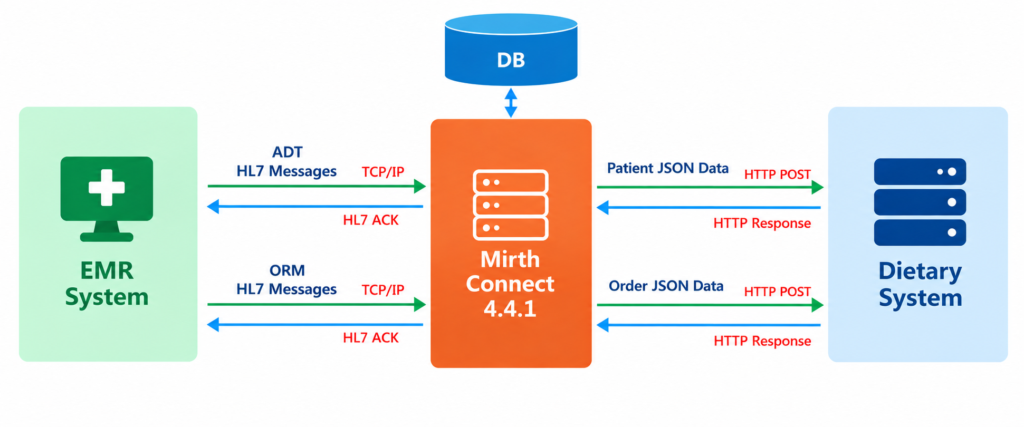
The integration comprises two outbound Mirth channels, involving data transformation between HL7 and JSON formats.
Two Outbound Interfaces (EMR to Dietary System):
- ADT: Patient and Encounter Information transformed into JSON data
- ADT^A01 = Admission
- ADT^A02 = Transfer
- ADT^A03 = Discharge
- ADT^A04 = Registration
- ADT^A08 = Patient Information Update
- ADT^A11 = Cancel Admission
- ADT^A12 = Cancel Transfer
- ADT^A13 = Cancel Discharge
- ADT^A34 = Merge Patient ID (MRN)
- ADT^A35 = Merge Account Number
- ADT^A41 = Merge Account Number
- ORM^O01: Physician Dietary Orders transformed into JSON data
How It Works
My Contributions
- Infrastructure Setup: Helped the client install Mirth Connect 4.4.1
- Data Mapping: Designed and verified the data mapping between the HL7 messages and JSON format with the client
- Implementation: Developed and configured the Mirth Connect channels
- Testing & Production Deployment: Completed UAT and moved the interface to the production environment
- Documentation: Prepared a clear and simple user manual with flow diagrams, implementation details, and potential maintenance procedures, including failure checkpoints to enable the client to support and maintain the integration independently in the future
Biobase LAB & LIMS Application Integration
Integrating Lab application with LIMS application for Lab Results
My Role
Interface Analyst & Developer – Sole Mirth Connect Developer
- Integration Engine: Mirth Connect 4.5
- Data Standard: HL7 v2.3.1 (
ORU^R01messages) - Connectivity: TCP/IP communication between the Lab Application and Mirth Connect, and file-based communication between Mirth Connect and the LIMS application.
Project Overview:
This project involved investigating and resolving an existing integration issue between the Biobase Lab Application and the LIMS application. The Biobase Lab Application was unable to send laboratory results to the LIMS application running on another server.
According to the client, the integration had been working successfully through the Mirth Connect engine until a network shutdown occurred a few months earlier. Since then, laboratory results had been entered manually into the LIMS application.
The requirement was to restore and automate the real-time transmission of laboratory results from the Biobase Lab Application to the LIMS application.
Mirth Connect was already installed on both servers; however, the installation files were corrupted, and we were unable to log in. Additionally, no documentation or reference material was available for the previous integration setup. Therefore, the process relied heavily on manual investigation, exploration, and iterative testing.
The first step was to identify the Biobase Lab Application’s outbound data settings, followed by determining the data type, data flow, and correct destination endpoint for sending laboratory results so that the LIMS application could process them properly. Through a single online session, we identified and verified each component step by step, including the outbound data settings, data type, data flow, and destination endpoint.
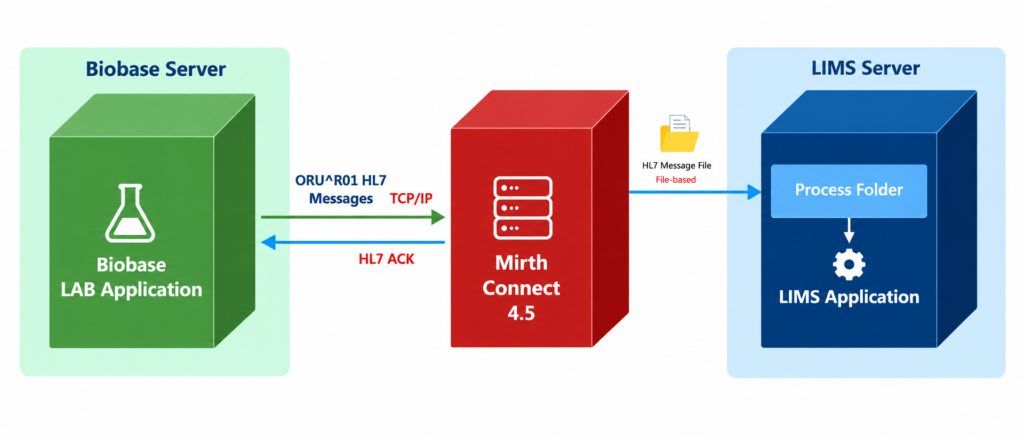
The integration comprises one outbound Mirth Connect channel that transfers laboratory results from the Lab Application to the LIMS application.
One Outbound Interface (Lab Application to LIMS Application):
- ORU^R01: Laboratory Results
How It Works
The workflow is straightforward. Whenever a laboratory result becomes available in the Biobase Lab Application, it is transmitted as an HL7 v2.3.1 ORU^R01 message to the newly installed Mirth Connect instance on the LIMS server. During the investigation, we found that this connection was configured in the Lab Application’s settings.
The Mirth Connect channel writes the message to a designated folder, from where the LIMS application picks it up and processes it. The processed result then becomes available in the LIMS application. We identified this folder through a process of trial and error
- Investigation: Investigated the existing system to understand the data flow and identify the integration issue.
- Infrastructure Setup: Assisted the client in installing Mirth Connect 4.5 on the LIMS server
- Implementation: Developed and configured a Mirth Connect channel
- Testing & Verification: Tested the integration and verified that the data was successfully transmitted and reflected in the LIMS application
- Documentation: Prepared a clear and simple user manual with flow diagrams, implementation details, and potential maintenance procedures, including failure checkpoints, to enable the client to support and maintain the integration independently in the future
Appointment & Modality Emulator Integration
Integrating an Appointment System with a Modality Emulator for Modality Worklist
My Role
Interface Analyst & Developer – Sole Mirth Connect Developer
- Integration Engine: Mirth Connect 4.5
- Other Tools: HL7 Smart Interpreter for HL7 message analysis
- Data Standard: JSON, HL7 v2.3 (ORM^O01 messages), and DICOM for MWL
- Connectivity: HTTP communication between the Appointment Application and Mirth Connect, and TCP/IP communication between Mirth Connect and the Modality Emulator application
Project Overview:
The requirement was to send patient and appointment information from the Appointment Application to the modality (X-ray machine), eliminating manual data entry at the modality.
The Appointment Application generates data in JSON format, while the modality accepts DICOM data through a MWL (Modality Worklist) server. A MWL server can be part of a RIS or PACS system, or it can be deployed as a separate, independent system. The project used ConQuest as the DICOM MWL Server, which receives HL7 v2.3 ORM messages and provides the Modality Worklist to the modality.
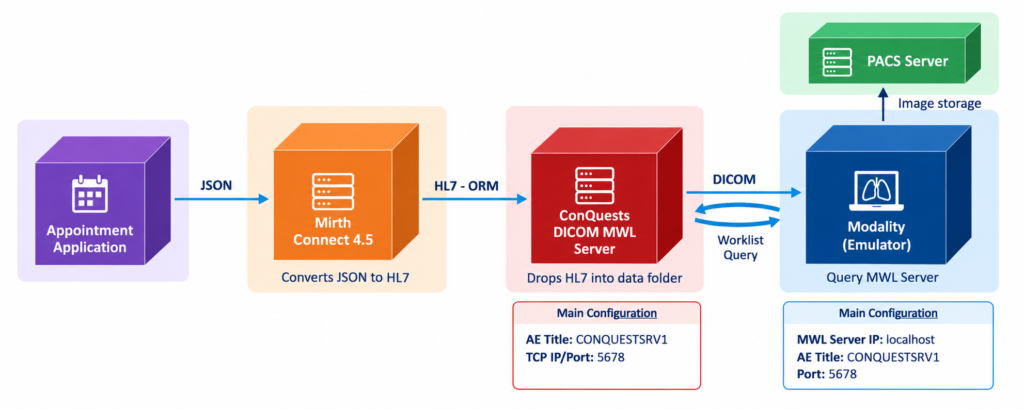
The integration comprises one Mirth Connect channel that integrates a Radiology Order/Appointment System with a Modality Emulator via the ConQuest MWL Server.
One Interface (Appointment Application to MWL Server):
- ORM^O01: Radiology Orders
How It Works
First, the ConQuest MWL Server was configured with the required AE Title and TCP/IP port, enabling the Modality Emulator to connect and perform Modality Worklist (MWL) queries.
Next, the ConQuest MWL Server IP address, TCP/IP port, and AE Title were configured in the Modality Emulator to establish communication and perform Modality Worklist (MWL) queries.
Whenever a radiology order is created in the Appointment System, it is sent to the Mirth Connect channel as JSON data. The Mirth Connect channel processes the JSON data, constructs an HL7 v2.3 ORM^O01 message, and sends it to the ConQuest MWL Server through file-based communication. ConQuest MWL then processes the file and makes the worklist data available.
On the Modality Emulator, clicking the “Request Worklist” button retrieves the Modality Worklist (MWL) data from the ConQuest MWL Server.
My Contributions
- Infrastructure Setup: Assisted the client in installing and configuring Mirth Connect 4.5, ConQuest MWL Server, and the Modality Emulator
- Data Analysis & Design: Analyzed sample JSON data from the Appointment System and designed the corresponding HL7 ORM message
- Implementation: Developed and configured the Mirth Connect channel
- Testing & Verification: Initially developed and tested the integration locally as a POC, followed by deployment and testing in the client environment
- Documentation: Prepared a clear and simple user manual covering flow diagrams, implementation details, and maintenance procedures, including failure checkpoints, enabling the client to independently support and maintain the integration
PACS Data Migration
Interface for Migrating and Automatically Synchronizing Patient and Radiology Results Data Across Multiple PACS Servers
My Role
Interface Analyst & Developer – Sole Mirth Connect Developer
- Integration Engine: Mirth Connect 4.4.1
- Other Tools: pgAdmin for PostgreSQL database access and analysis
- Data Standard: XML
- Connectivity: JDBC database connections between Mirth Connect and the source and destination PACS databases
Project Overview:
The requirement was to migrate patient and radiology results data from a source PACS database to multiple destination PACS databases and then automatically keep the databases synchronized.
The integration was designed to migrate the required PACS data in a controlled sequence while maintaining data dependencies and ensuring that each record was processed only once for each destination PACS.
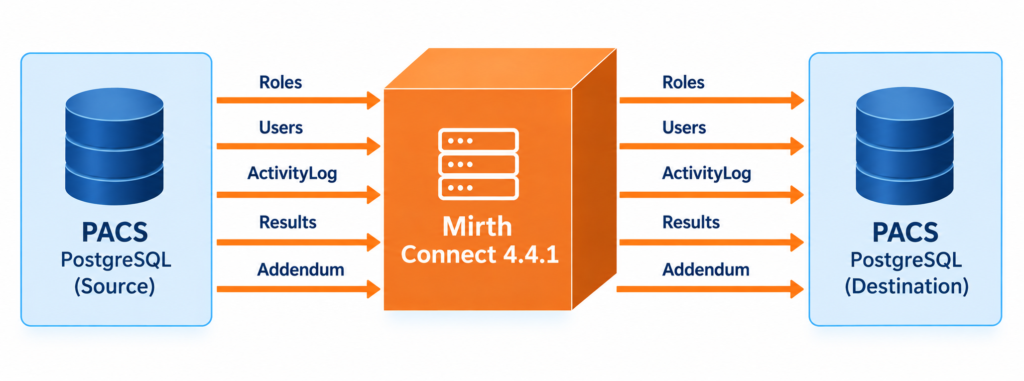
The integration comprises five Mirth Connect channels that integrate a source PACS database server with multiple destination PACS database servers
Five Interfaces to Synchronize PACS Data (Source PACS to Destination PACS):
- User Roles
- Users
- User Activity
- PACS Results
- PACS Addendum Results
A process flag was added for each destination PACS to each of the above tables. The flag indicates whether a record has been processed (migrated) for that destination. It remains NULL if the record has not yet been processed and is set to Yes once the record has been successfully processed.
These tables have dependencies – for example, Users depends on Roles, while Results depends on Users. Therefore, maintaining the correct migration sequence was essential to preserve data integrity. The data was migrated sequentially in the following order: Roles, Users, User Activity, PACS Results and PACS Addendum Results.
How It Works
Mirth Connect selects one record at a time in FIFO order, processing the oldest record first based on the sequence ID column in each table. The channel picks up the oldest unprocessed record (where the Process Flag is NULL), sets the Process Flag to Yes, and inserts the record into the corresponding table in the Destination PACS database. If a record already exists, the existing record is deleted based on the key column before the new record is inserted. The channel continues this process for each record, migrating the data from the Source PACS database to the Destination PACS database.
Once the migration was completed, we manually verified the migrated data by comparing record counts and checking a sample of randomly selected records.
The Mirth Connect channels remain active to automatically synchronize the PACS databases after the initial migration.
The process then continues with the second interface, followed by the third, and so on.
My Contributions
- Infrastructure Setup: Assisted the client in installing and configuring Mirth Connect 4.4.1
- Connectivity Verification: Verified database connectivity from the Mirth Connect server to both the Source and Destination PACS databases
- Source and Destination Data Analysis: Analyzed the database tables using pgAdmin tool and their relationships to understand data dependencies and determine the appropriate migration sequence
- Implementation: Developed and configured the Mirth Connect channels
- Execution: Successfully migrated data to one PACS destination and provided the client with step-by-step instructions to perform the migration for the remaining PACS destinations
- Documentation: Prepared a clear and simple user manual to enable the client to independently support and maintain the integration
Project Tracker with HL7 Message Interpreter
Developed a Java Spring MVC web application to track integration projects and provide an HL7 message interpreter
My Role
Project Idea, Design & Sole Developer
- IDE: Eclipse for Java and Oracle SQL Developer
- Database: Oracle 12c
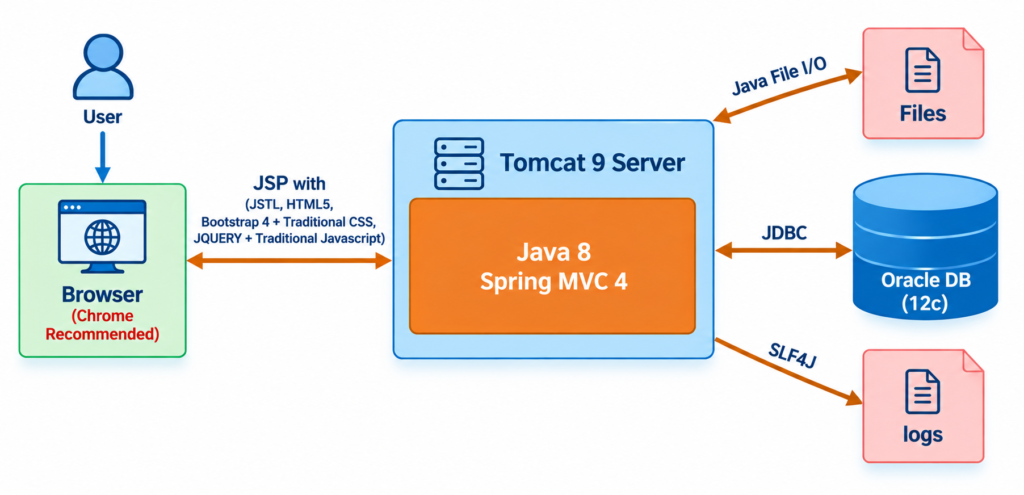
- Framework: Java 8 with Spring MVC 4 for the backend and Bootstrap 4 for the frontend
- Connectivity: JDBC database connection
- Application Server: Apache Tomcat 9
- Frontend Presentation Layer: JSP with JSTL, HTML5, Bootstrap 4, traditional CSS, JavaScript, and jQuery
- Middle Business Layer: Java 8 with Spring MVC, including controller classes, beans, and utility classes
- Backend Database & File Layer: Oracle 12c and server file repositories for storing uploaded files and logs
Project Overview:
Integration work involves gathering and managing a lot of information and files associated with each solution, including issues encountered and the steps taken to resolve them.
This created a need for a centralized place where the Integration team could store, manage, and share this information. This led me to develop an application that would make the information easier to access for the team and others as well.
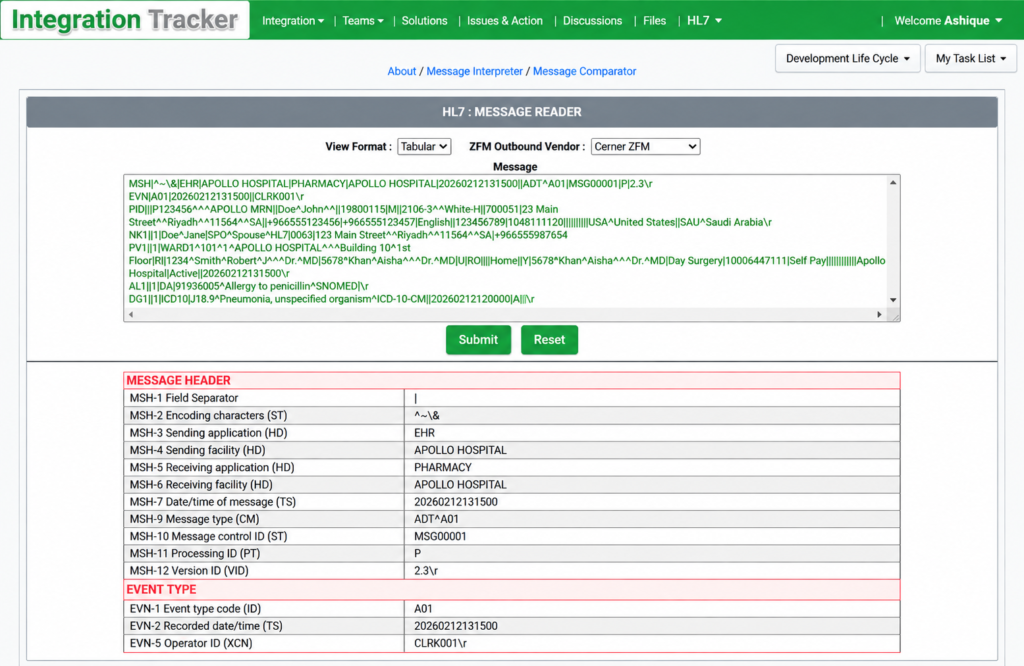
Also, our EHR HL7 v2.x messages contain many Z-segments that are specific to the EHR, which means that commonly available online HL7 v2.x readers could not properly interpret them. This created a need for an HL7 interpreter that could handle these customized segments. Therefore, I developed a page as part of this application that can read and interpret commonly used HL7 messages and segments, including the EHR-specific Z-segments.
I developed this application from scratch, deployed it on our hospital’s local server during the COVID-19 pandemic lockdown, and completed it in just 50 days.
This is a role-based application with the following user types:
1. Integration Admin User
Admin users can create, update, and manage users (including other admin users), vendors, solutions, issues, action items, forums, daily task lists, and associated files through the Admin Data Management Center. Admin users can upload, download, view, and delete any file. They can also generate reports on solution details and status.
2. Integration Team User
Users can create and update their own issues, action items, forum posts, daily task lists, and associated files for their assigned integration projects. They can upload, download, view, and delete files belonging to them. Other information, such as users, vendors, solutions, issues, and action items, is available as read-only.
3. Non-Integration User
Users can create and update their own forum posts and associated files. They have read-only access to other information, such as integration projects, users, vendors, and solutions.
4. Guest User (No User Account)
Guest users do not require user credentials. They can log in by entering their name and have limited read-only access. Guest users can view integration concepts, users, vendors, solutions, issues, action items, and forums. They do not have access to any files.
Application Modules
Integration Menu consists of three sub-menus: Basic Concept, Steps Involved, and Challenges, along with a description of the application.
Teams Menu consists of two sub-menus for viewing Integration Team and Vendor Information.
Solutions Menu takes users to the Solutions Dashboard, which is also the default landing page. From this page, users can navigate to almost every part of the application, including individual solution information pages, solution issues and action item lists, flow diagrams, associated vendor and hospital integration team information, solution forums, associated files, and more. Solutions are categorized into two types: Hospital Internal and Third-Party solutions.
Issues & Actions Menu takes users to the Issues List page, where issues can be filtered by solution and status. Users can also add new issues and action items from this page.
Discussions Menu takes users to the Forums List page, where discussions can be filtered by solution. Users can also add new discussions and comments from this page.
Files Menu takes users to the Uploaded Files List page, which displays files associated with solutions, forums, issues, users, and other entities. Users can view, upload, download, and delete files from this page.
HL7 Menu consists of two sub-menus: Interpreter and Structures. The Interpreter page provides HL7 message reading and message comparison functionality. The Structures page allows users to explore the structures of different HL7 messages, segments, and fields. These pages are continuously enhanced based on requirements, as it is not practical to cover the complete HL7 specifications.
User-Specific Menu provides users with options to update their profile, change their password, and manage their task list. Admin users also have access to the Admin Data Management page.
Cleartrip & IRCTC API Services Integration
Developed a Java Spring MVC application module within an existing online ticket booking web application to book various types of train tickets offered by IRCTC (Indian Railway Catering and Tourism Corporation) through web services.
My Role
Java/J2EE Developer – Team of Three
- IDE: NetBeans 6.8 on Linux Ubuntu
- Framework: Java with Spring MVC 2.5 for the backend, and HTML/CSS/JavaScript & AJAX for the frontend
- API Connectivity and Data: Axis web services with XML data
We followed good practices, such as:
- Client-side and server-side validation for business rules
- Kept related files in a common location for easy access and reuse
- Developed reusable utility methods for common tasks, including XML parsing
- Used only CT-approved open-source Apache JARs
- Used Memcached instead of session objects for temporary data
- Used AJAX where appropriate for faster processing
- Processed XML data using XPath
Project Overview:
The project involved developing a web application module to integrate Cleartrip’s online train booking application with IRCTC’s Indian Rail Packages & Special Trains services, with IRCTC as the service provider and the application as the service consumer.
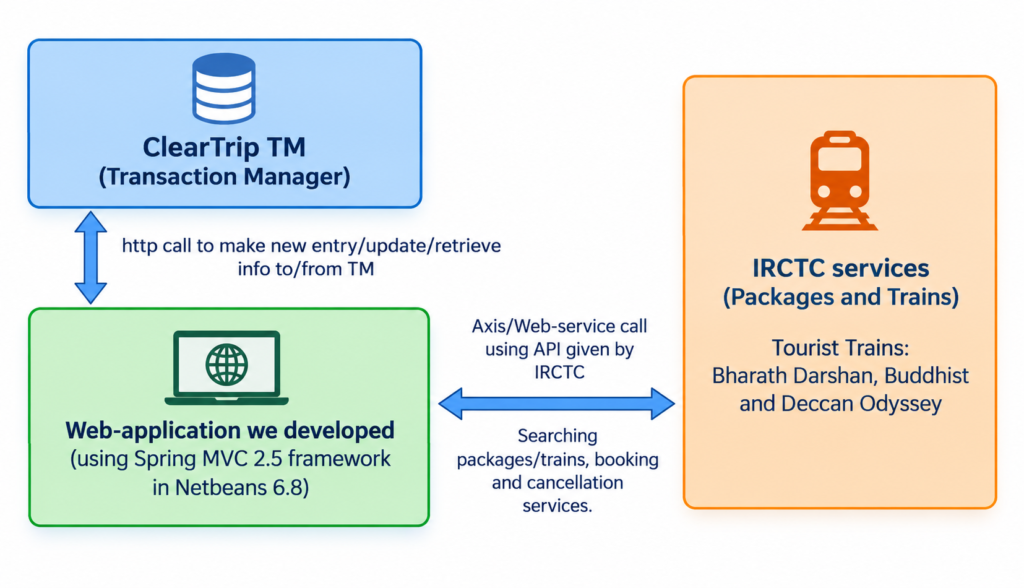
We were a team of three working at the client’s office, led by a very supportive and experienced senior team leader.
The project lifecycle was as follows:
- Discussion, Feasibility & Design: 10 days
- Development & Coding: 35 days
- Testing & Bug Fixing: 15 days
- Production Deployment: 2 days
How It Works
1. Search Page
Users enter their journey and travel preferences, such as origin, destination, category, train type, number of adults, and children. The available options are dynamically populated based on the selected travel type.
2. Search Results Page
The system displays available packages or tourist trains along with relevant details such as journey dates, classes, fares, availability, and occupancy information. Availability is checked by calling the IRCTC services through AJAX, and users can view itinerary or route details.
3. Booking Page
The booking process guides the user through four stages: reviewing the selected package or train, logging in or creating an account, entering traveler details, and completing the payment. For packages, users can also modify the default room occupancy where applicable.
4. Result Page
After the booking process is completed, the system displays a booking summary with the relevant details for the selected train or package. Users can also generate the corresponding e-Ticket. If the booking fails, an error page is displayed with the relevant information.
Business Rule Examples
- The number of adults must be greater than or equal to the number of children
- The total number of travelers, including children, must not exceed ten
- Various room occupancy rules
These are selected healthcare integration and Java/J2EE projects from my broader professional experience. I have worked on many other projects over the years that are not included in this portfolio.